Trends & Insights
·
October 1, 2026
Is Safari An Adblocker?
Yes and no. And the "yes" is growing.
Is Safari An Adblocker?
Trends & Insights
·
October 1, 2026

compliant

💡 TL;DR: Is Safari an adblocker? Yes, just not the kind you're used to. Safari leaves ad slots in place but removes the mechanisms that help make them valuable. Fewer buyers can bid, yield drops, and some slots end up with no ad to serve at all.
Is Safari Blocking Your Ads?
Ask many publishers whether Safari blocks ads and you'll get a puzzled look.
It doesn't leave ad slots empty wholesale, and Apple has never overtly presented it as an adblocker. Its messaging today is about blocking tracking, not ads.
Yet since its beginning, Safari has steadily taken apart the infrastructure programmatic advertising runs on: first cookies, then identifiers, and now the domains that request and deliver ads. The ad inventory that remains faces fewer bidders and earns less.
Safari is also far from a niche browser. It accounted for 15.1% of global browser traffic in Q3 2025, according to Cloudflare data. On iPhone, other browsers run on WebKit and get its tracking prevention by default, so the effect reaches well beyond people who deliberately choose Safari. Chrome, Brave, Firefox and Edge on iOS may look different on the surface, but they all run on the same engine as Safari under the hood.
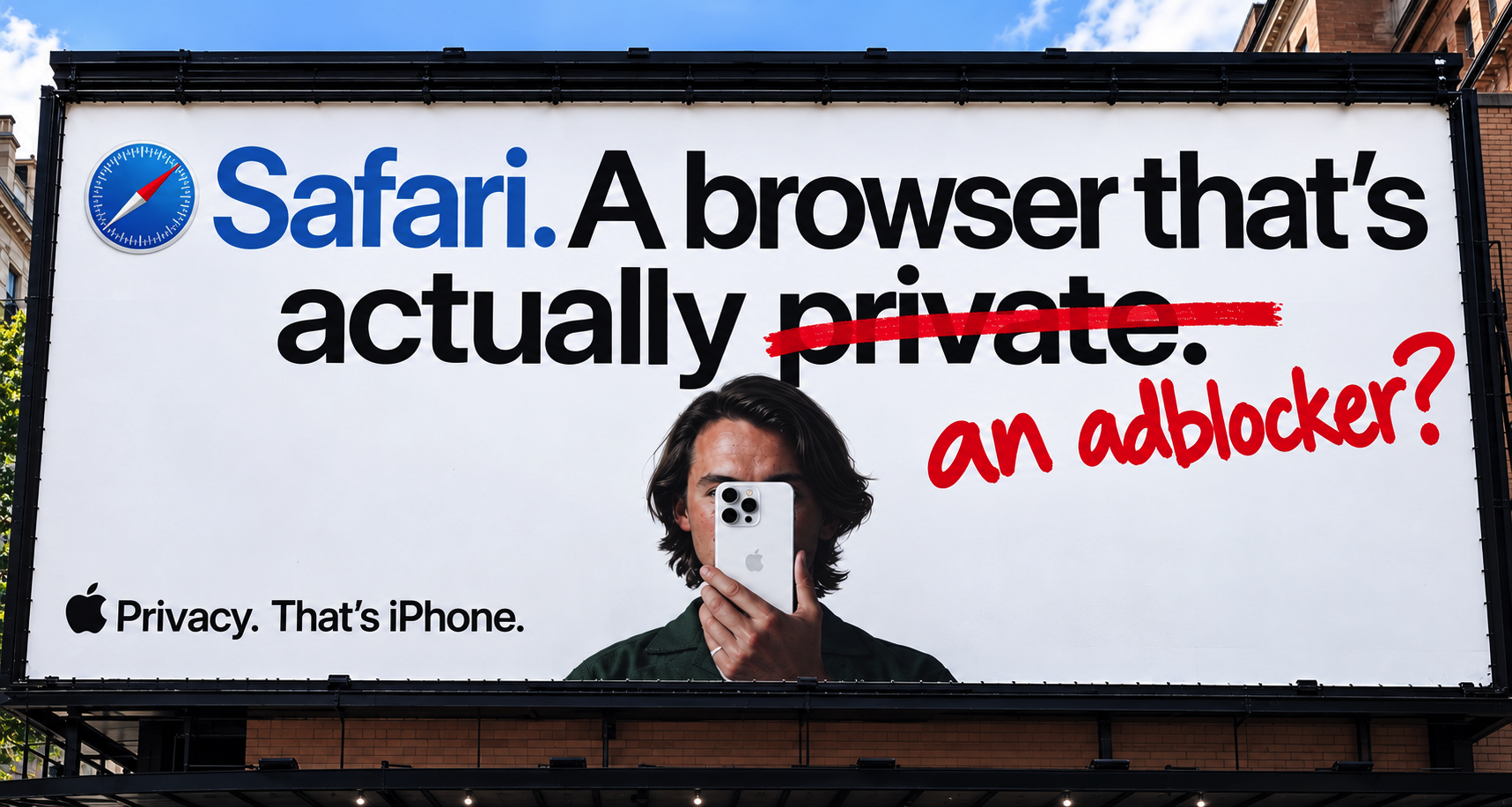
Today, Apple is marketing the privacy position harder than ever. In June 2026 it launched "Clingers", a global campaign across broadcast, billboards, cinema, YouTube and digital display. The film shows anthropomorphized trackers clinging to non-Apple users until Safari shakes them off.
For publishers, the campaign is a warning sign. Apple has spent years quietly cutting off ad demand, and now it's paying handsomely to get more people onto the browser that does it.
Below, we trace each adblocking step Safari has taken, what it costs publishers today in lost revenue, and how to consider it alongside other forms of adblocking
Adblocking Isn't All-Or-Nothing
Most people picture adblocking one way: an extension like uBlock Origin, or a browser like Brave, that removes every ad from the page. The ad slot sits empty and earns nothing.
We use a broader definition: any mechanism that stops an ad slot from being serviced by intended demand. That can mean shutting demand off completely, or limiting it so fewer buyers can compete.
🔴 Full adblocking: Demand is cut off completely. The ad request never fires or the ad never renders and the slot stays empty. Examples of tools that do this are uBlock Origin and Brave.
⭕ Partial adblocking: Demand is throttled. An example is blocking cookies or other signals, which shrinks the number of campaigns that can bid. The slot may still fill, with fewer bidders and at a lower price.
Safari is mainly in the second group. It doesn't block the ad slot itself. It blocks the cookies, identifiers and domains that let demand reach the slot. Strip away enough of those and, for some impressions, no qualifying bids arrive at all. The slot goes unfilled, and the net result is the same as a fully blocked ad.
Early Adblocking On Safari
2003: A cookie-skeptical beginning. Since Safari first launched in 2003, Apple's default cookie policy has stopped third parties from setting new cookies unless they already had cookies from a direct visit. It was an early sign that Apple saw cross-site tracking as something to limit by default, well before privacy became a headline feature.
2005: Private Browsing. Safari 2.0 was the first mainstream browser with a privacy mode. When a user left private mode, their cookies, history, cache and form data were thrown away. Trackers could still follow a user normally within a private session, but lost them once it ended. It set Safari's reputation as a privacy-first browser.
2010: Safari Reader and adblocker extensions. Safari 5 introduced Safari Reader, a clean article view that Apple's own marketing said "removes annoying ads". The press framed it as an adblocker aimed at publishers. The same release added support for extensions, and a month later Apple switched them on with an official Extensions Gallery. AdBlock for Safari was among the first, giving desktop Safari users their first installable adblocker. Both required users to opt in.
2011: Do Not Track. Safari added support for Do Not Track, a signal asking websites not to track the user. Compliance was voluntary and most of the industry ignored it. Apple removed it in 2019, saying it could be used as a fingerprinting variable, and relied on its own tracking prevention instead.
2015: Content blockers arrive. iOS 9 let developers build Safari content blockers for the first time. Adblock apps shot up the App Store charts. Marco Arment's Peace adblocker became the No. 1 paid app in the US, and established names like Adblock Plus released their own Safari blockers. Mainstream adoption never followed. Users had to install an app, dig into Safari's settings to switch it on, and troubleshoot sites that broke. For most iPhone owners it was too fiddly, so Safari's default experience kept ad slots intact.
2017: Intelligent Tracking Prevention (ITP) 1.0. Safari began identifying domains that track users across sites and limited their third-party cookies to 24 hours after the user last clicked or tapped on the domain's own site. That hit independent adtech hardest, because people use Google and Facebook daily but almost never interact with an SSP, DSP or retargeter. Criteo told investors it expected ITP to cut its Q4 2017 revenue 8–10% below its own forecast.
2019: ITP 2.1 and 2.2. As third-party cookies got harder to use, adtech increasingly stored identifiers in first-party cookies set by JavaScript on the publisher's own site. ITP 2.1 responded by capping all persistent cookies set through JavaScript at seven days. ITP 2.2 went further, cutting that to one day in certain cases involving tracking parameters passed through links. Server-set cookies, such as those commonly used for logins, weren't subject to these limits at the time. But for IDs stored through JavaScript, a Safari visitor who returns after a week looks brand new, which weakens frequency capping, audience targeting, attribution and the first-party IDs used in header bidding.
March 2020: All third-party cookies blocked by default. Until then, Safari only restricted domains it had flagged as trackers, so anything unflagged still got through. Safari 13.1 dropped that distinction and blocked every third-party cookie, making it the first mainstream browser to do so. Cookie syncing between SSPs and DSPs, the plumbing behind most programmatic targeting, had been eroding since 2017. Now it stopped working entirely.
September 2020: Safari's protections extend to every iPhone browser. With iOS 14, Apple turned WebKit's tracking prevention on by default for every browser on iPhone and iPad, not just Safari. That included Chrome: on iPhone, Google's own browser has blocked third-party cookies by default since 2020, while Chrome everywhere else still allows them.
2021–2025: From Cookies To Everything Else
With third-party cookies gone, Apple extended its protections to the other signals that can identify a user across sites: IP addresses, click IDs in links, and device fingerprints.
2021: IP addresses hidden from trackers. With iOS 15, Safari started hiding every user's IP address from known tracking companies, including adtech. IP addresses are one of the main signals used to fingerprint a device, so this took away another way buyers recognized and targeted users.
2023: Fingerprinting crackdown in Private Browsing. Safari 17 went further against fingerprinting, targeting the device details it relies on, such as screen size, fonts and browser version. Its new Advanced Tracking and Fingerprinting Protection made fingerprinting harder, blocked requests to known trackers so they never left the browser, and stripped click identifiers from links. For the first time, Safari's built-in protection worked like a traditional adblocker, stopping requests at the source rather than limiting what they could do. All of this applied only in Private Browsing, and most of it still does.
2024: Distraction Control. Safari 18 gave users their first built-in way to hide parts of a page, ads included, with a tap. The industry pushed back hard: UK publishers and a coalition of French media and advertising bodies wrote to Tim Cook arguing it amounted to an adblocker. Apple insisted it isn't one, and in practice it's too fiddly to work as one: items are hidden one at a time, and ads that refresh come back. The feature has stayed manual since, and the pushback may be part of the reason.
2025: Fingerprinting protection goes default. With Safari 26, Apple added new default protections against scripts it identifies as fingerprinting tools, restricting their access to device characteristics, storage, and navigational information such as URL parameters and referrers. Blocking requests to known trackers and stripping click IDs still applied only in Private Browsing, unless the user turned them on.
2026: Safari Goes After Post-Cookie IDs (And The Trade Desk) With A Private Blocklist
On September 29, AdExchanger reported that The Trade Desk can no longer serve ads in Safari on devices running iOS 27, which began rolling out on September 14.
In February, Apple added code to WebKit, the open-source engine behind Safari, that lets it block requests to a specific list of domains in normal browsing. The technique on its own isn't new: Safari has blocked tracker requests in Private Browsing since 2023, and it's how traditional adblockers work. What's new is the method combined with the target. The list, which Apple keeps private, appears aimed at post-cookie identity: the IDs the industry built to recognize users once third-party cookies were gone.
With iOS 27, that list went live. According to AdExchanger, it covers identity providers including Unified ID 2.0 (uidapi.com), ID5, Audigent, LiveRamp and Permutive. Constantine Mirin, who pulled the list out of Apple's own builds, found the same nine entries in macOS 27, so Safari on Mac is affected too. The impact on identity is measurable: of the 66 user-ID modules in Prebid.js, five call a blocked domain. They are UID2, The Trade Desk's Unified ID, ID5, LiveRamp's RampID and Audigent's HadronID.
It also includes adsrvr.org, the domain The Trade Desk uses to request and deliver ads. With that domain blocked, The Trade Desk can't serve ads in Safari on iOS 27 and macOS 27 at all. In the company's own bug report to WebKit, its senior director of engineering stresses that adsrvr.org is its core ad request and delivery domain, not an identity service.
The block covers the whole domain, not just one part of it. Every subdomain under adsrvr.org is caught, too. The Trade Desk's own evidence, from a Yahoo! article in normal (not private) browsing on iOS 27, showed its requests blocked while Google's ad requests loaded normally.
So the iOS 27 update resulted in two types of adblocking in Safari:
- 🫥 Losing IDs makes a buyer bid less or not at all
- ⛔️ Losing the delivery domain means the buyer can't deliver ads, period
The first continues what Safari has done since 2017. The second is new: for the first time, Safari blocks the infrastructure that delivers ads by default, not just the data used to target them. For most publishers, that means the largest independent DSP can no longer serve ads in Safari on iOS 27 and macOS 27.
Will Apple Reverse The Trade Desk Block?
Apple hasn't said, and the arguments cut both ways.
The case for a reversal. adsrvr.org delivers ads, which makes it an odd fit on a list otherwise made up purely of identity providers. That makes a mistake plausible. Apple has acknowledged The Trade Desk's bug report and says it's investigating. Apple also runs its own ad business, so keeping a major rival ad platform blocked could invite regulatory scrutiny.
The case against. Apple is likely concerned that adsrvr.org also facilitates The Trade Desk's Unified ID and other tracking, which would give it a privacy rationale for keeping the domain on the list. The block fits Apple's wider effort against cross-site ID matching, and Apple has rarely rolled back a Safari restriction.
A middle path. The Trade Desk's tracking and ad delivery run on different subdomains of adsrvr.org. Safari's current check blocks whole domains, so blocking adsrvr.org also blocks the subdomains that deliver ads. Apple could block only the tracking subdomains, such as match.adsrvr.org, and the rule-list format it's moving to supports exactly that, but so far it hasn't. That would address Apple's privacy concern without shutting out a major DSP.
The case against independent adtech. Whatever Apple decides, its blocking keeps landing hardest on independent adtech — intentionally or not. The walled gardens are either protected or recover more easily: tools like Meta's Conversions API and Google's Enhanced Conversions match users on logged-in data that independent adtech doesn't have. Now, on the same page, The Trade Desk's ad requests were blocked while Google's loaded normally, and Google pays Apple an estimated $20 billion a year to be Safari's default search engine. That deal covers search, not display ads. But it means Apple shares in Google's ad revenue, while the independents competing with Google bear the brunt of its blocking.
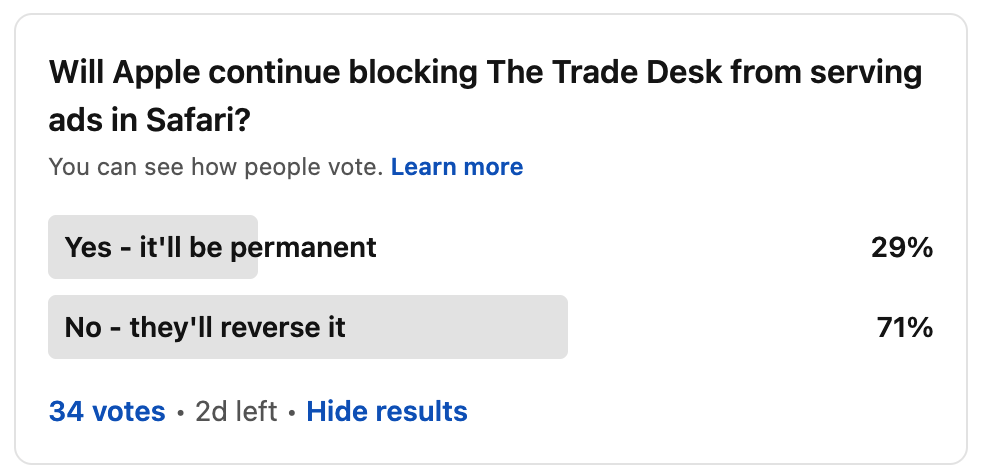
Still not sure? Ad-Shield's co-CEO, Dustin Cha, ran a quick poll on "adtech LinkedIn", and these are the responses so far:
What Safari Adblocking Costs Publishers
Ads still load on Safari. But buyers have fewer signals to price on, so many bid lower or skip the impression altogether. And on iOS 27, at the time of writing, one major DSP can't serve ads at all.
The price gap is large. Raptive, which sells ads for thousands of publishers, reported in 2024 that Safari traffic monetizes at about half the rate of Chrome traffic with third-party cookies.
A rough sense of scale: eMarketer forecasts US open-web programmatic display spend at about $42.5 billion in 2027. Suppose Safari makes up a fifth of those impressions and earns half what Chrome does. Pricing Safari at parity would then add roughly $5 billion a year, in the US alone.
Treat that as an order of magnitude, not a precise figure. The gap is real and it is measured in billions, and it comes from partial adblocking in its quietest form: slots still fill, but demand is missing.
A Reality Check
Safari is not Brave. It doesn't wholesale hide ads by default, and plenty of demand still gets through. Several of its strongest protections still apply only in Private Browsing or have to be switched on by the user.
Apple doesn't directly present Safari as an "adblocker". Its marketing, including the Clingers campaign, currently pitches Safari as a browser that stops trackers and doesn't mention ads. For publishers, though, the effect works like partial adblocking: fewer buyers and lower prices.
Apple offers its own measurement alternative, on its own terms. Since 2021, Safari has included Private Click Measurement, a built-in way to attribute ad clicks to conversions without cookies or user-level data. It shows Apple isn't against advertising outright. But it only measures clicks, not views, carries a tiny amount of data per click, and doesn't replace the targeting and measurement Safari has removed.
The Trade Desk block may not be permanent. Apple hasn't explained it. It's possible adsrvr.org was blocked by "accident". Apple's WebKit privacy lead has said the team is investigating and will let The Trade Desk know if and when changes are ready to test. That commits Apple to nothing, but a reversal is a real possibility.
Safari keeps blocking more, not less. Every major Safari release since 2017 has added restrictions. None has meaningfully rolled them back. And, the blocklist itself may soon be updatable remotely. According to Mirin's analysis of the WebKit source, a change on September 25 moves the blocklist into a rule set, and "once that ships, Apple can change it without an OS release." That would make it work like a typical adblocker, whose filter lists update constantly without new software. Publishers should expect the list to grow, and Safari to keep clamping down on the mechanisms that let ad demand reach their pages.
What This All Means For Publishers
1. Demand is being stripped from Safari traffic, one layer at a time. Each release since 2017 has removed another piece: third-party cookies, then first-party cookie lifespan, click IDs, identity graphs, and now a DSP's delivery domain. Many of these don't remove the ad slot, so the losses are easy to miss. They show up as thinner auctions and lower CPMs.
To see it on your own site:
- Track Safari against other browsers over time. Break out revenue, bid density and CPMs by browser, and compare Safari with Chrome on the same pages. A widening gap is the clearest sign demand is being removed, whatever Apple changes next.
- Measure the iOS 27 impact in your own data. Compare Safari revenue per thousand pageviews on iOS 27 with iOS 26, looking at both over the same period since iOS 27 launched on September 14. The gap is roughly what the block is costing you, after other buyers have filled what they can.
- Ask your SSPs for your Trade Desk exposure. Your SSPs should be able to break out spend by DSP. Ask whether they can filter it to Safari to see how much came from The Trade Desk before mid-September. That's your maximum exposure.
2. Safari is one part of a bigger adblocking picture. Whereas Safari is a partial adblocker, ads slots are also fully blocked by browser extensions, privacy browsers like Brave, VPNs, public Wi-Fi, and company and school networks. These layers stack on top of each other. Many of them also block the scripts publishers use to measure traffic, so the affected visits are hidden from both your analytics and your ad stack. We call this dark traffic.
Added up, the scale is significant. Our Dark Traffic Report found that dark traffic makes up 79% of all adblocked traffic, equal to 18% of total internet users. Those users are invisible to publisher measurement and earn nothing.
Can Trusted Server Help?
Yes and no.
Yes, for The Trade Desk incident. IAB Tech Lab's Trusted Server is an open-source framework that routes ad and ID calls through the publisher's own domain. WebKit's new check overlooks requests to the page's own domain, so calls routed this way fall outside Safari's blocklist. Meaning, adsrvr.org would get through as it stands, right now.
No, as a holistic answer to adblocking. Trusted Server's approach is not bullet proof. Far from it. Adblockers that work inside the browser, such as extensions like AdBlock and browsers like Brave, can physically access the page and remove the ads. They are not dependent upon catching the ad request masked inside the publisher's domain, which is a subdomain. And once a publisher's Trusted Server subdomain is spotted, filter lists can simply add it. So any ad delivered via Trusted Server's methodology remains structurally vulnerable to blocking. Meaningfully so.
The same weakness applies to the Trade Desk block. Routing calls through the publisher's domain only works because WebKit's check currently misses it. Apple has a long record of closing tracking routes, and once it can update Safari's blocklist remotely, it will be able to react and block much faster. So even here, Trusted Server may only work for a while.
The bigger picture. By our estimate, Trusted Server will be effective at preserving ad delivery for roughly 15–25% of the adblocked page views created by 1BN+ adblocker users globally. Its bigger benefit is enabling faster, less frictional pages, which reduces one of the main reasons people install adblockers in the first place. Ultimately, Trusted Server is a framework. Protecting ads from every form of adblocking takes a setup that detects and reacts in real time. Trusted Server has its place in the mix, but it isn't a silver bullet.
What Publishers Can Do About Adblocking
1. On Safari: bring The Trade Desk back. Ad-Shield can reinstate The Trade Desk's demand on Safari, so iOS 27 and macOS 27 auctions get one of their biggest bidders back.
2. Everywhere else: restore what adblocking takes away. Safari is only one part of how adblocking defunds publishers. Ad-Shield restores measurement and monetization for hidden page views impacted by every type of adblocking: browser extensions, privacy browsers like Brave, VPNs, public Wi-Fi, and company and school networks. That dark traffic shows up in your dashboards again, and your own ad stack serves it, in every browser. This typically generates a 6–14% net ad revenue uplift, overnight.
The Bottom Line
Safari has never been an adblocker in the traditional sense. Since 2003, though, it has moved from cautious cookie defaults and opt-in adblockers to blocking cookies, identifiers and, now, the domains that request and deliver ads, all by default.
The Trade Desk block may be reversed. The trend is unlikely to be.
Safari's losses are at least visible, as lower CPMs in a browser report. Dark traffic is harder to see, because much of it never appears in your dashboards at all. Around 18% of internet users sit in that measurement and monetization blind spot, with Safari's partial blocking layered on top.
Knowing how big each piece is on your own site is the first step to getting that revenue back.
How much ad revenue is your dark traffic costing you?
👉 Calculate your dark traffic revenue gap in 60 seconds
FAQs
Is Safari an adblocker?
Yes, but not in the traditional sense. Safari doesn't remove ads by default the way Brave or an adblock extension can, although Reader mode and Distraction Control let users strip ads from individual pages. More significantly, its tracking protections block cookies, identifiers and some network requests used by advertising systems. That reduces the demand competing for an impression and, in some cases, prevents an ad slot from having any demand to load at all.
Does Safari block ads by default?
Not visibly, but it does block ad demand by default. Safari doesn't blanket block ads from the page unless users opt in with Reader mode, Distraction Control or a content blocker. But its default tracking protections, including third-party cookie blocking and fingerprinting protections, restrict the signals buyers use for targeting, measurement and attribution, and on iOS 27 and macOS 27 it blocks one major DSP's ad delivery domain outright. That's partial adblocking, switched on for every user.
What is Intelligent Tracking Prevention (ITP)?
Intelligent Tracking Prevention is Safari's system for restricting cross-site tracking, first released in 2017. It limits how long cookies and other storage can persist, and it underpins Safari's full block on third-party cookies, which has been the default since March 2020.
Does Safari block third-party cookies?
Yes. Safari has blocked all third-party cookies by default since March 24, 2020. Chrome, by contrast, announced in April 2025 that it would keep third-party cookies.
Why are Safari CPMs lower than Chrome CPMs?
Without third-party cookies and other identifiers, many buyers can't target or measure Safari users, so they bid less or not at all.
Is The Trade Desk blocked on Safari?
As of October 1, 2026, Safari on iOS 27 and macOS 27 blocks adsrvr.org, The Trade Desk's core ad request and delivery domain. That prevents The Trade Desk's normal ad-serving path from working in Safari. Apple is investigating, so the block may not be permanent
Does Safari's tracking prevention affect Chrome on iPhone?
Yes. Browsers on iOS run on Apple's WebKit engine, and since iOS 14 they inherit WebKit's tracking prevention. Chrome on iPhone is subject to the same restrictions as Safari.
What is dark traffic?
Dark traffic is web traffic that a new generation of brutal tadblockers hides from publisher analytics and ad stacks, so it goes unmeasured and unmonetized. According to Ad-Shield's Dark Traffic Report, it makes up 79% of all adblocked traffic, equal to 18% of internet users.
Does Safari cause dark traffic?
By default, no. Dark traffic is adblocked traffic hidden from your analytics and ad stack. Default Safari still loads ads and measurement scripts, so those visits stay visible, just worth less. But some opt-in setups do create dark traffic: for example, when a user turns on Reader mode, or installs a Safari content blocker app such as AdGuard for iOS.

Ad-Shield enables open web publishers to measure and monetize the 79% of adblocking traffic that is not captured by their existing adblock recovery stack.
Most publishers see a 4-5X adblock revenue increase.

.png)